[phpBB Debug] PHP Warning: in file [ROOT]/includes/bbcode.php on line 488: preg_replace(): The /e modifier is no longer supported, use preg_replace_callback instead
[phpBB Debug] PHP Warning: in file [ROOT]/includes/bbcode.php on line 488: preg_replace(): The /e modifier is no longer supported, use preg_replace_callback instead
[phpBB Debug] PHP Warning: in file [ROOT]/includes/bbcode.php on line 488: preg_replace(): The /e modifier is no longer supported, use preg_replace_callback instead
[phpBB Debug] PHP Warning: in file [ROOT]/includes/bbcode.php on line 488: preg_replace(): The /e modifier is no longer supported, use preg_replace_callback instead
[phpBB Debug] PHP Warning: in file [ROOT]/includes/bbcode.php on line 488: preg_replace(): The /e modifier is no longer supported, use preg_replace_callback instead
[phpBB Debug] PHP Warning: in file [ROOT]/includes/bbcode.php on line 488: preg_replace(): The /e modifier is no longer supported, use preg_replace_callback instead
[phpBB Debug] PHP Warning: in file [ROOT]/includes/bbcode.php on line 488: preg_replace(): The /e modifier is no longer supported, use preg_replace_callback instead
[phpBB Debug] PHP Warning: in file [ROOT]/includes/bbcode.php on line 488: preg_replace(): The /e modifier is no longer supported, use preg_replace_callback instead
[phpBB Debug] PHP Warning: in file [ROOT]/includes/bbcode.php on line 488: preg_replace(): The /e modifier is no longer supported, use preg_replace_callback instead
[phpBB Debug] PHP Warning: in file [ROOT]/includes/bbcode.php on line 488: preg_replace(): The /e modifier is no longer supported, use preg_replace_callback instead
[phpBB Debug] PHP Warning: in file [ROOT]/includes/bbcode.php on line 488: preg_replace(): The /e modifier is no longer supported, use preg_replace_callback instead
[phpBB Debug] PHP Warning: in file [ROOT]/includes/bbcode.php on line 488: preg_replace(): The /e modifier is no longer supported, use preg_replace_callback instead
[phpBB Debug] PHP Warning: in file [ROOT]/includes/bbcode.php on line 488: preg_replace(): The /e modifier is no longer supported, use preg_replace_callback instead
[phpBB Debug] PHP Warning: in file [ROOT]/includes/bbcode.php on line 488: preg_replace(): The /e modifier is no longer supported, use preg_replace_callback instead
[phpBB Debug] PHP Warning: in file [ROOT]/includes/bbcode.php on line 488: preg_replace(): The /e modifier is no longer supported, use preg_replace_callback instead
[phpBB Debug] PHP Warning: in file [ROOT]/includes/bbcode.php on line 488: preg_replace(): The /e modifier is no longer supported, use preg_replace_callback instead
[phpBB Debug] PHP Warning: in file [ROOT]/includes/bbcode.php on line 488: preg_replace(): The /e modifier is no longer supported, use preg_replace_callback instead
[phpBB Debug] PHP Warning: in file [ROOT]/includes/bbcode.php on line 488: preg_replace(): The /e modifier is no longer supported, use preg_replace_callback instead
[phpBB Debug] PHP Warning: in file [ROOT]/includes/bbcode.php on line 488: preg_replace(): The /e modifier is no longer supported, use preg_replace_callback instead
[phpBB Debug] PHP Warning: in file [ROOT]/includes/bbcode.php on line 488: preg_replace(): The /e modifier is no longer supported, use preg_replace_callback instead
[phpBB Debug] PHP Warning: in file [ROOT]/includes/bbcode.php on line 488: preg_replace(): The /e modifier is no longer supported, use preg_replace_callback instead
[phpBB Debug] PHP Warning: in file [ROOT]/includes/bbcode.php on line 488: preg_replace(): The /e modifier is no longer supported, use preg_replace_callback instead
[phpBB Debug] PHP Warning: in file [ROOT]/includes/bbcode.php on line 488: preg_replace(): The /e modifier is no longer supported, use preg_replace_callback instead
[phpBB Debug] PHP Warning: in file [ROOT]/includes/bbcode.php on line 488: preg_replace(): The /e modifier is no longer supported, use preg_replace_callback instead
[phpBB Debug] PHP Warning: in file [ROOT]/includes/bbcode.php on line 488: preg_replace(): The /e modifier is no longer supported, use preg_replace_callback instead
[phpBB Debug] PHP Warning: in file [ROOT]/includes/bbcode.php on line 488: preg_replace(): The /e modifier is no longer supported, use preg_replace_callback instead
[phpBB Debug] PHP Warning: in file [ROOT]/includes/bbcode.php on line 112: preg_replace(): The /e modifier is no longer supported, use preg_replace_callback instead
[phpBB Debug] PHP Warning: in file [ROOT]/includes/bbcode.php on line 112: preg_replace(): The /e modifier is no longer supported, use preg_replace_callback instead
[phpBB Debug] PHP Warning: in file [ROOT]/includes/bbcode.php on line 112: preg_replace(): The /e modifier is no longer supported, use preg_replace_callback instead
[phpBB Debug] PHP Warning: in file [ROOT]/includes/bbcode.php on line 112: preg_replace(): The /e modifier is no longer supported, use preg_replace_callback instead
[phpBB Debug] PHP Warning: in file [ROOT]/includes/bbcode.php on line 112: preg_replace(): The /e modifier is no longer supported, use preg_replace_callback instead
[phpBB Debug] PHP Warning: in file [ROOT]/includes/bbcode.php on line 112: preg_replace(): The /e modifier is no longer supported, use preg_replace_callback instead
[phpBB Debug] PHP Warning: in file [ROOT]/includes/bbcode.php on line 112: preg_replace(): The /e modifier is no longer supported, use preg_replace_callback instead
[phpBB Debug] PHP Warning: in file [ROOT]/includes/bbcode.php on line 112: preg_replace(): The /e modifier is no longer supported, use preg_replace_callback instead
[phpBB Debug] PHP Warning: in file [ROOT]/includes/bbcode.php on line 112: preg_replace(): The /e modifier is no longer supported, use preg_replace_callback instead
[phpBB Debug] PHP Warning: in file [ROOT]/includes/bbcode.php on line 112: preg_replace(): The /e modifier is no longer supported, use preg_replace_callback instead
[phpBB Debug] PHP Warning: in file [ROOT]/includes/bbcode.php on line 112: preg_replace(): The /e modifier is no longer supported, use preg_replace_callback instead
[phpBB Debug] PHP Warning: in file [ROOT]/includes/functions.php on line 4868: Cannot modify header information - headers already sent by (output started at [ROOT]/includes/functions.php:3937)
[phpBB Debug] PHP Warning: in file [ROOT]/includes/functions.php on line 4870: Cannot modify header information - headers already sent by (output started at [ROOT]/includes/functions.php:3937)
[phpBB Debug] PHP Warning: in file [ROOT]/includes/functions.php on line 4871: Cannot modify header information - headers already sent by (output started at [ROOT]/includes/functions.php:3937)
[phpBB Debug] PHP Warning: in file [ROOT]/includes/functions.php on line 4872: Cannot modify header information - headers already sent by (output started at [ROOT]/includes/functions.php:3937)
Civic EG • View topic - DIY Combination Switch Fix (Headlight Switch) AND Wiper Comb
Page 1 of 2

DIY Combination Switch Fix (Headlight Switch) AND Wiper Comb

PostPosted: Sun Mar 22, 2009 11:40 pm
by danomatic93
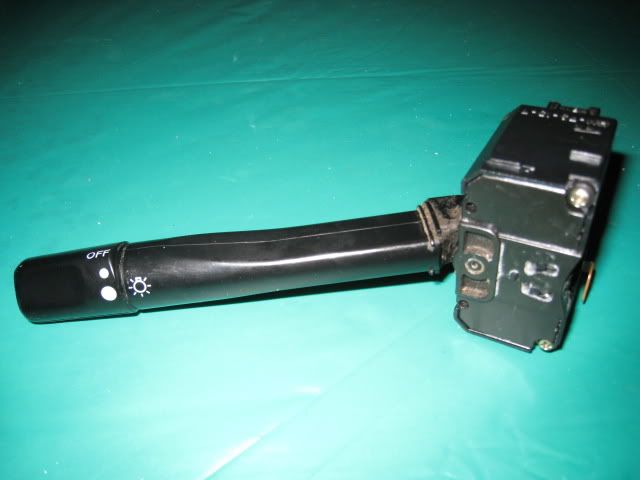
With age and use the Combination Switch (Headlight switch) will fail to turn on the headlights, sometimes intermittently. It’s annoying and there is a way to fix it.
Image

VIDEO 1
Quick video:


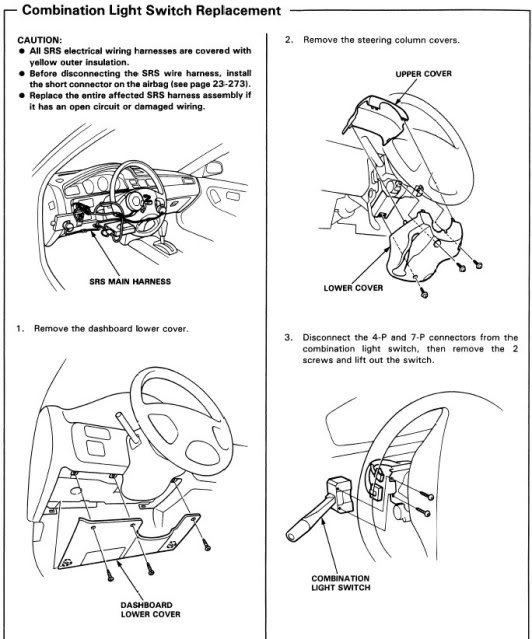
1. To start, remove the steering column’s three screws and remove the column. (step 2 in manual image)
2. Turn the steering wheel so that you can remove the two screws holding the Combination switch in. Then unplug the two plugs to remove the switch. (step 3 in manual image)
Image

3. Remove the two screws on the back of the switch.
Image

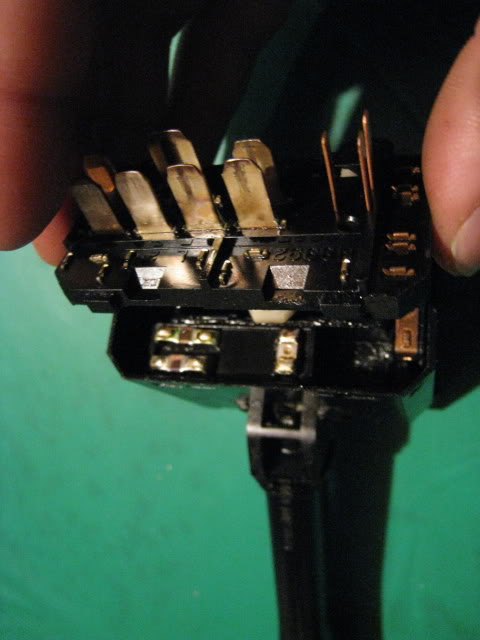
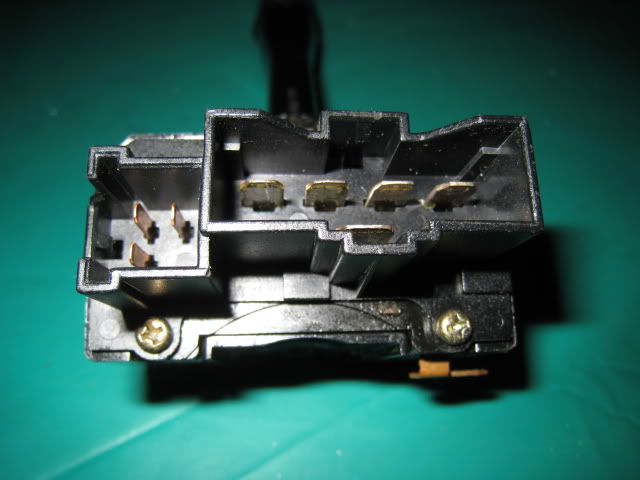
4. Notice that the pin shield is a separate piece from the pin piece underneath. If you hold the pin piece underneath down, you can pull the top shield piece off. Pull from the side with the two screw holes.
Image

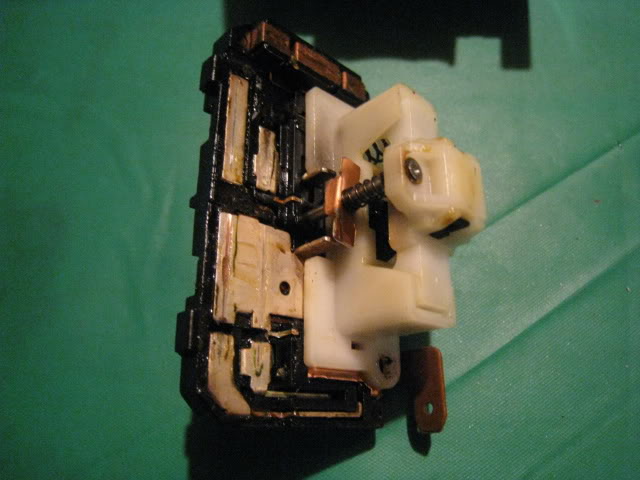
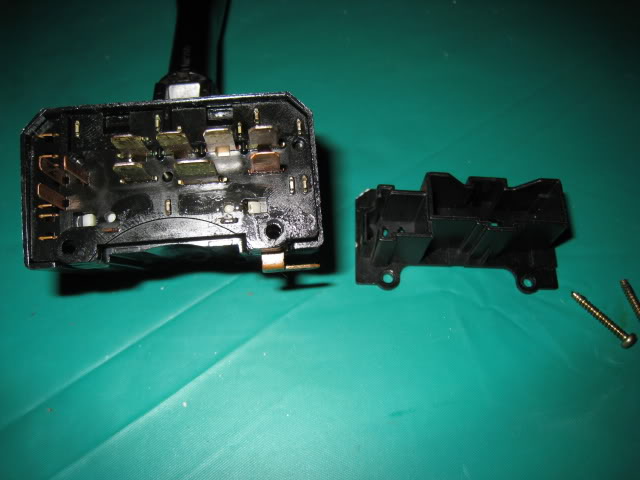
5. Notice the two little white tabs below the pins (seen in image above). They are part of yet another separate white piece. Also, notice that just like the previous step, you can hold down on this new white underneath piece. So, press in these two white tabs while holding the white piece down and pull up on the top pin piece.

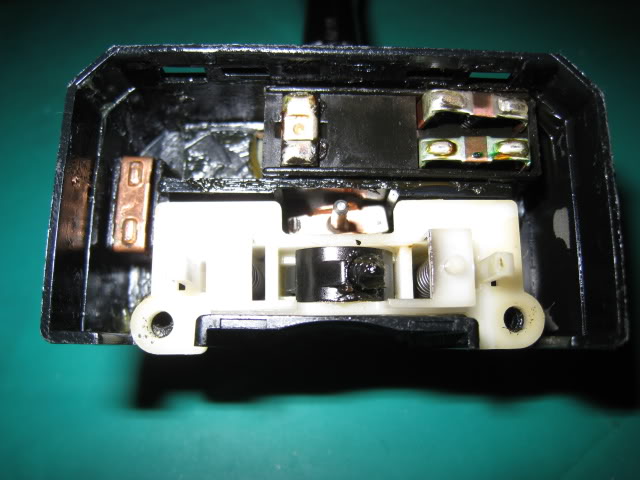
Once that top pin part is off, here’s what you’ll see:
Image
Make sure the contact piece on the left stays in the middle otherwise you’ll lose you blinkers.

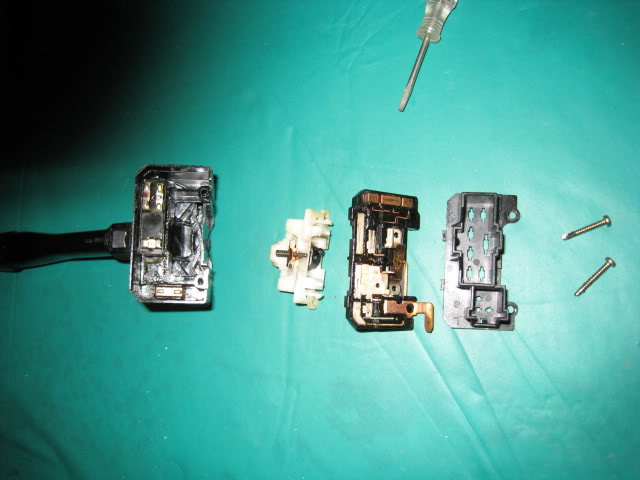
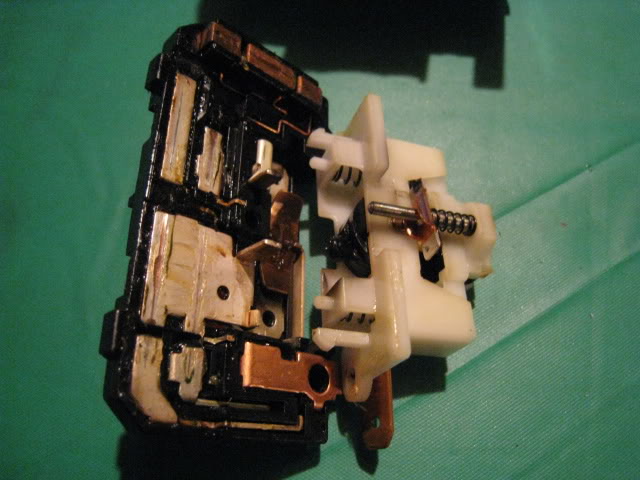
Everything is now apart:
Image

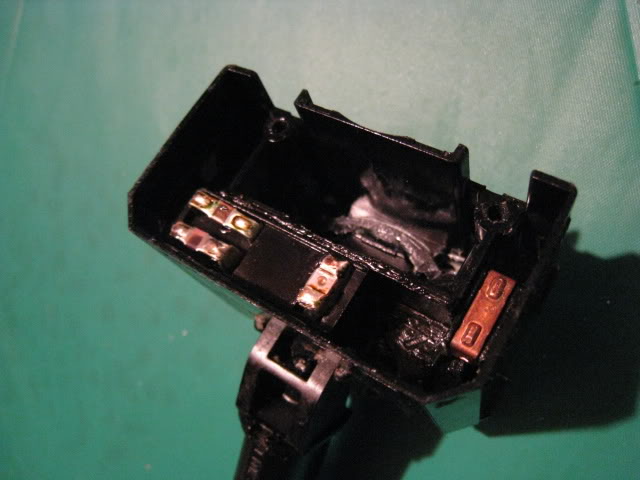
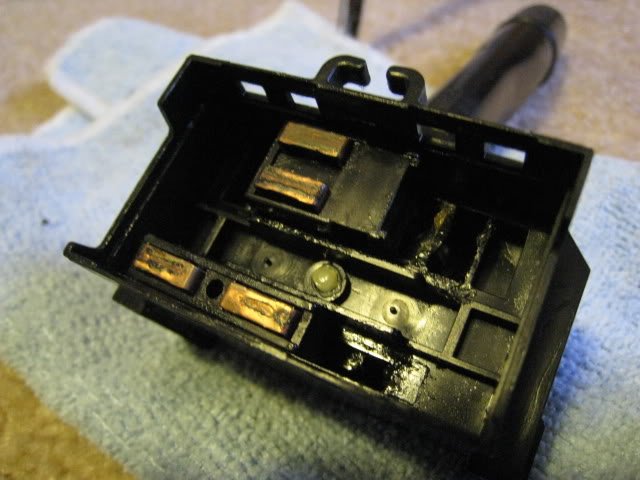
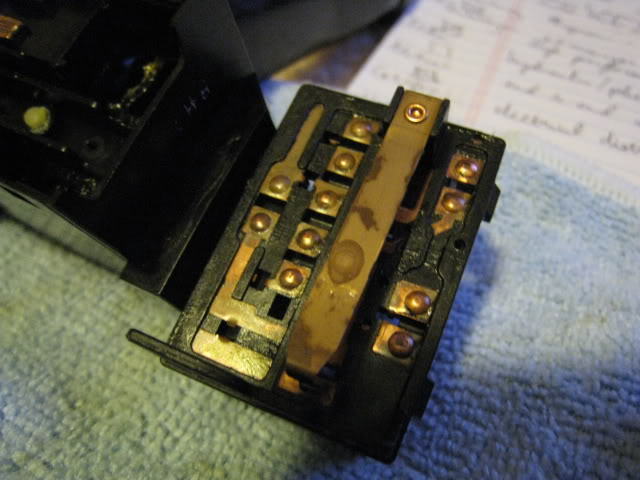
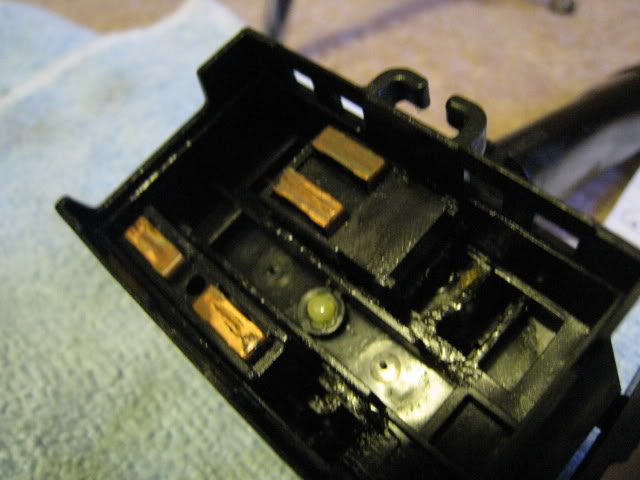
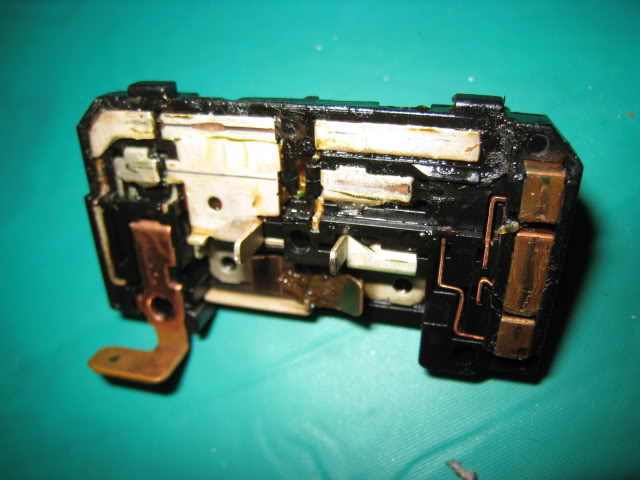
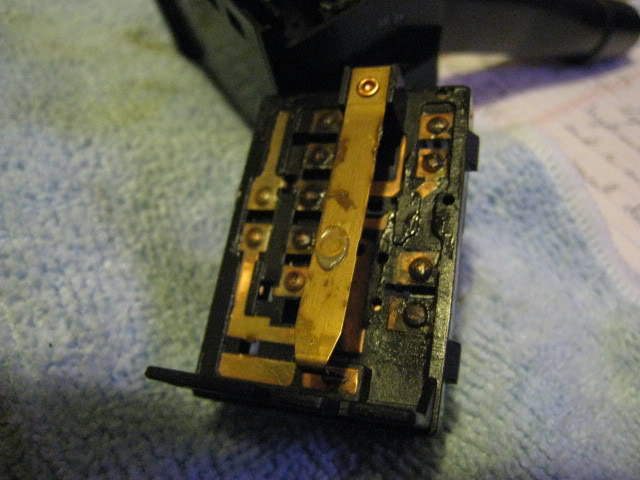
6. Clean the contacts on the underside of the piece with the pins. My tool of choice is a Q-tip and rubbing alcohol. It should look like this after being cleaned:
Image

7. Lubricate the contacts. Add some dielectric grease to the contacts. You can use some of the grease that’s in the switch or grab a $1 pack of dielectric grease next time you’re at a parts store.

8. Reassemble
Image
Image
Image
Image


VIDEO 2
Quick video of checking operation of the other side of the Combo Switch. Basically just an inspection and finding the springs, to replace any broken ones, would be quite difficult to find:


VIDEO 3
Wiper Combo Switch, procedure similar to Headlight Switch, so if you need check out this video for a quick walkthrough:


Dirty
Image
Image

Clean
Image
Image

PostPosted: Mon Mar 23, 2009 12:56 am
by smokinsoljah420
:thumb: nice diy bro!! :woot: ill be doing this to get rid of this damned hatch! lol! :thumb:

PostPosted: Mon Mar 23, 2009 11:39 pm
by stockd15
awesome diy! When i put my blinker on, it doesnt return to the nuetral position after i have turned. Is there a way to fix that? Sorry to hijack the thread

PostPosted: Wed Mar 25, 2009 2:50 am
by danomatic93

PostPosted: Wed Mar 25, 2009 4:46 am
by danomatic93
Updated to include the opposite side of the Combo Switch and the Wiper Combo Switch.

PostPosted: Wed Mar 25, 2009 5:30 am
by ohDirka
Nice write up :thumb: Changed to sticky :thumb:

PostPosted: Wed Mar 25, 2009 2:15 pm
by marvinp8700
Nice diy :thumb:

PostPosted: Wed Mar 25, 2009 2:46 pm
by Elpimpo

PostPosted: Sun Apr 19, 2009 8:44 pm
by 1sicksi

PostPosted: Wed May 13, 2009 2:10 pm
by BLaCkSiLo

PostPosted: Tue Oct 06, 2009 12:40 am
by BaTzEG92
My headlights generally turn on fine. However, my dash cluster usually has a lengthy delay (sometimes into the tens of minutes) before illuminating. Is this also related to the combo switch? And I'm still experimenting, but it seems as though wiggling the switch arm the right way will make the dash cluster light up.

What's strange is, somehow my alarm is wired into a lot of lights (my fogs, dash cluster, fan cluster, front/rear sidemarkers) and they all blink when my doors are open. So when I open the door, dash cluster lights up, then when I close the door and turn on the combo switch, it won't :?

And speaking of the turn signal not returning, there are certain occasions where I'll go pretty much lock to lock, and my signal will change direction. By that I mean, suppose my right signal is on, I'm making a sharp right into a parking lot and have to make an immediate left, upon turning to the left my signal will turn off and then reverse so that I'm signaling left. And no, I'm not just hitting it as I spin the wheel :lol:

Ahhh my hatch :D

PostPosted: Tue Oct 06, 2009 4:16 am
by danomatic93

PostPosted: Thu Dec 10, 2009 2:43 am
by BurqueB16

PostPosted: Thu Dec 10, 2009 3:10 am
by BaTzEG92

PostPosted: Sun Dec 13, 2009 1:08 am
by danomatic93